
Beyond the Semantic Layer: Building a Context Layer for the Agentic Era
At a glance
A context layer puts your warehouse schema, joins, metric definitions, and business knowledge in one reviewable place so data agents query governed context instead of guessing field names. A look at how it works, and at ktx, the open-source context layer.
Metrics, schema, dashboard logic, and domain knowledge in one place. Your team reviews. Agents query.
Writing SQL was never the hard part. Making it accurate and trustworthy against your warehouse always was. Point an AI agent like Claude or Codex at your data stack and ask a real analytics question, and the answer is usually mediocre: the agent can scrape some context from your git repos or whatever metadata it can find, but it doesn't know your joins, your metric definitions, or the business rules that give a number its actual meaning.
So how do we make data agents reliable and accurate for database queries? Everyone talks about harnesses, evals, and context layers, but the real challenge is bringing them together with data engineering and the context you already have, such as database schemas, a semantic layer, metric definitions, plus the business knowledge that normally never reaches the agent.
That's the question this blog tackles: how agents can work with the data stack and analytics, and how a context layer fits in. We also take an inside look at ktx, a new context layer that reads from the usual sources but also the less obvious ones (Markdown, Notion, etc.), driven by agentic workers.
The idea is to pull two kinds of knowledge into one reviewable place: the hard semantics (your warehouse schema, joins, and metric definitions as YAML and SQL) and the soft semantics (the business context living in docs, wikis, and Notion that agents usually never see). Both are committed to git and reviewed like code, so a human stays in the loop while agents get a warm start instead of a cold database connection. The payoff: more accurate answers with fewer (and cheaper) queries against the warehouse.
Modeling with Analytics AI Agents, with a Context Layer
Every business or data analyst faces mediocre results when prompting Claude or Codex on their data stack. It might figure out some context by reading the git repos or other metadata it can find. Still, the hard part is teaching the internals and business context that are unique to each business domain and company. So, how do we make AI agents for data and analytics reliable and accurate for database queries? Do we need to manually copy and paste Google Docs and Markdown files into the prompts, or can a context layer provide a more reliable, safe, and governed way to ask an AI assistant for analytics?
These days, it's much easier to ingest or add almost any number of new data sources with custom-built ETL data pipelines, whereas before we had to make hard decisions about what to include and what not. An AI agent, such as Claude or Codex, can merge multiple data pipelines that access the source database via CLIs and destinations via MCP, API, or CLI. But we still need an API and a process for updating source data, not just once. We need to make sure, test, and verify that the data is correct, potentially more than ever.
The challenge remains in modeling the data in a way that represents what the business is, making sure data flows fast but is also correct. But any AI assistant is only as good as the context we give it, and how easily it can read and express context, metrics, models, and knowledge. So, does the context layer solve these problems?
The context layer primarily supports the accuracy of SQL queries, continuous updates to the business context, and governance. Additionally, with a newer context layer, we can include more relevant business insights that are stored internally, usually in unstructured form, in tools like Notion as business documentation. Traditionally, these data weren't included because they weren't a "pure data source", but they can be helpful for decision-making, especially when done in an agentic way. Every bit of human-written data can help the agent make better decisions. So the ultimate problem we solve is to include more useful data and have a more agentic engineered way that is faster and more streamlined, especially to start with.
What's an Agentic Context Layer?
The core is to turn warehouse metadata, BI tool definitions, query history, docs, and approved metric definitions into reviewable files that agents can search and execute. We feed valuable metadata and actual data to agents and humans so that they can be ingested and discovered more easily in one place.
It's a further evolution of a semantic layer, such as Cube or AtScale, which are more focused on the modeling of metrics and domain knowledge and usually have less extensive knowledge of documentation, metadata outside of metrics, joins, and source data schema. And building a semantic layer from scratch can take time, as we need to extract metrics and unify them in a single repository in an additional layer. The main driver for a context layer is that it's automatically generated and includes additional business knowledge that lives outside the technical containers of data engineers, such as data catalogs, DDLs, or YAMLs, in tools like Confluence, Notion, and internal wikis.
I have written about how to model data in the agentic era, Data Modeling for the Agentic Era (Semantics, Speed, and Stewardship), and we've seen how metrics and context can strengthen a BI tool or insights. The context layer is all about context that we already have from our database catalogs (information_schema, data types, tables), more technical metadata, but also from our metrics inside the BI tools or in a declarative YAML, while adding new sources such as documentation in Markdown, rich text, fetched via API, CLI, etc. All with the goal of giving agents and LLMs more information to make the right calls autonomously.
Maxime Beauchemin calls documentation, wikis, and Markdown soft semantics, whereas YAML and the SQL metrics are hard facts or hard semantics. More soft semantics, such as business context from domain experts, help agents, and we need to make them available to other agents and humans too, building a full context layer that grows fast, where governance is essential.
Enhancing Gen AI Trustworthiness
Google describes How Looker's semantic layer enhances gen AI trustworthiness, and a semantic layer can reduce errors for generative AI and autonomous agents creating queries. They say:
We also acknowledge that data modeling for agents is not the same as data modeling for humans, and that shapes how we work with agents and context together.
Context Layers Saving Literal Money
In the end, it's also saving money, as more governance means the agent knows the system in more detail and therefore needs to make fewer queries to the actual database, or can do so in fewer iterations.
Queries on Snowflake, BigQuery, and Fabric can be expensive, and agents work at a different speed than humans. If we add more context to the agents, they need fewer queries because the information can be extracted from the retrieved context.
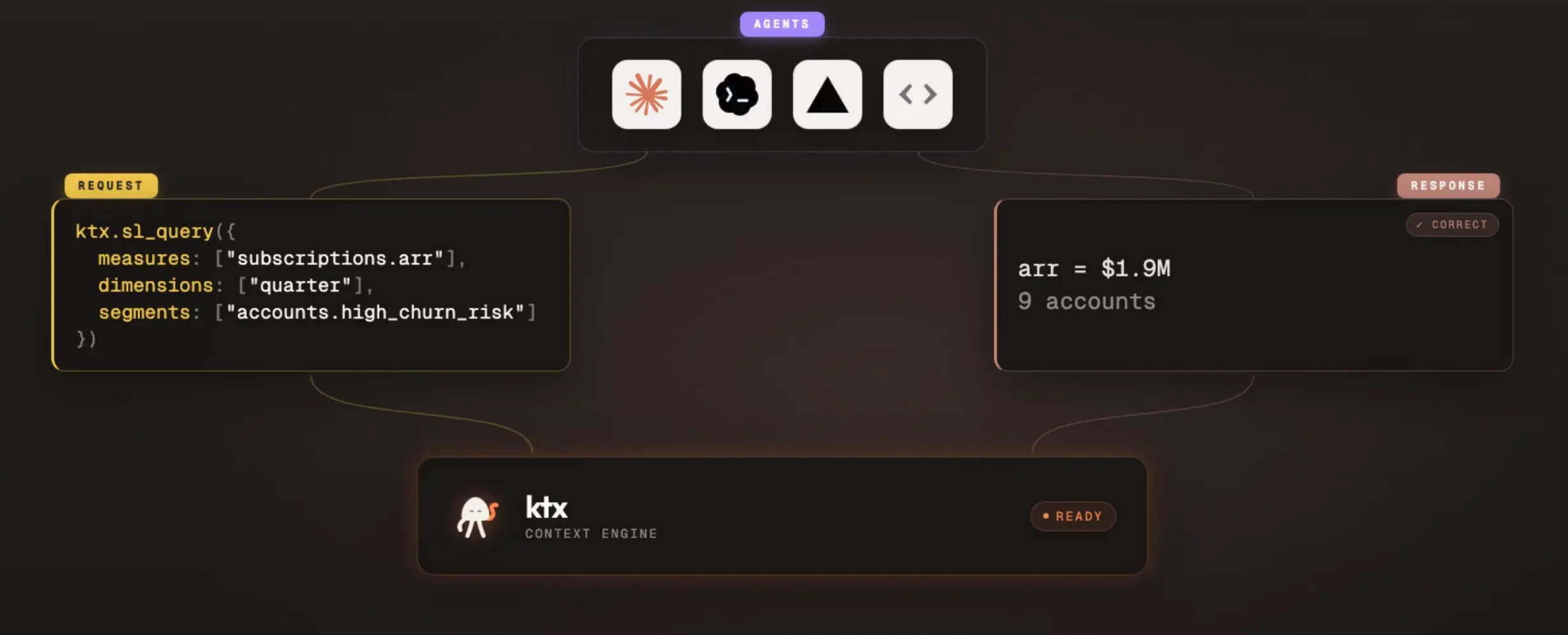
The agents have access to all this data, either directly or through CLI, skills, or MCP. The big advantage is that the agents get a warm-up and do not start with a cold database connection. All the warehouse schema, business semantics, BI usage patterns, and human documentation are in one single place.
Also, on the other end, verifying that the queries are correct is hard. More context can help with this.
Entering ktx: Open-source Context Layer
Kaelio launches its new open-source context layer solution called ktx. The goal is to get an OSS context layer solution that everyone can use for the future of analytics.
It started as an AI data agent platform, with the agent performing well on accuracy benchmarks against other platforms, which helped make the case for developing it further. Dashboards and agent interfaces are easier to build than ever, but these data apps need more durable and complete knowledge from all the company's data. This extended data added with ktx makes the agent more accurate.
How Ingesting Business Context Works
So how do we enhance business context for agents to make use of it?
Ingestion happens through two parallel items:
- ingests and prepares both data context such as data models, historical queries, BI dashboards, etc. and
- business context such as internal docs, Slack, etc., in a format that data agents can use to operate more reliably and with stronger governance.
If we look at a high-level overview, compared to a common semantic layer or logical layers in BI tools, you can build a knowledge layer around your business, with not only structured data but also unstructured knowledge from your company-wide internal documentation on Notion, or your data in Markdown or a git repository. ktx helps navigate and maintain this business knowledge.
Both of these can substantially enhance your "context", basically critical business insights that are usually internal or in a format that can't be easily used. The challenge here is obviously to separate the updated and accurate documentation or knowledge from the outdated, which needs more focus or rigid process flow/rules on documentation to keep the latest updates, adding an owner and also going back to docs and invalidating them as no longer relevant to improve the context quality.
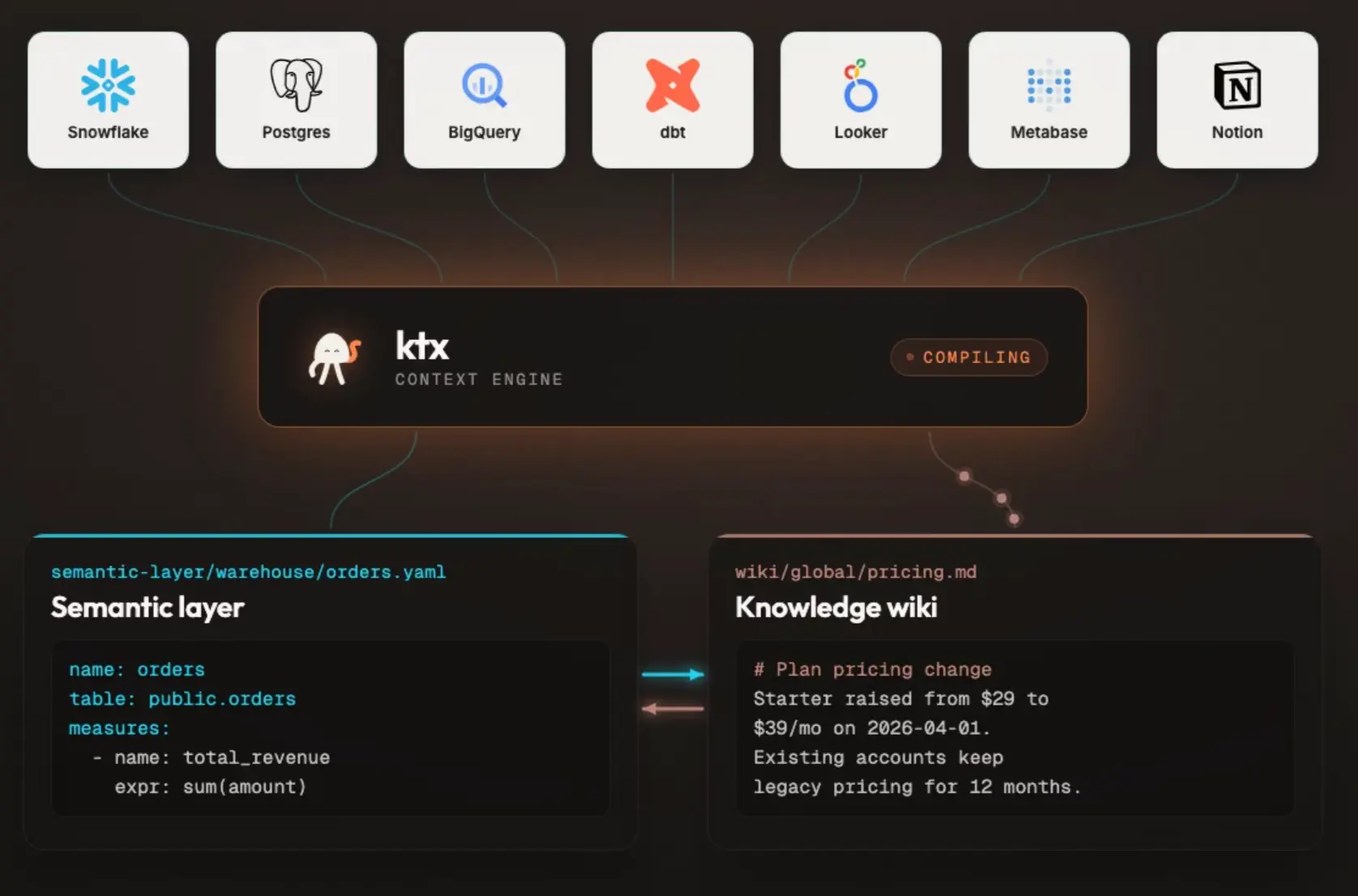
Smart agents such as Claude, Codex or any other that get context have built-in tools to understand business metrics, and combined with this newly ingested unstructured knowledge, they can help us get accurate responses against our warehouse or across our various data sources, and act as the human curator of data sets and entities for BI dashboards and apps.
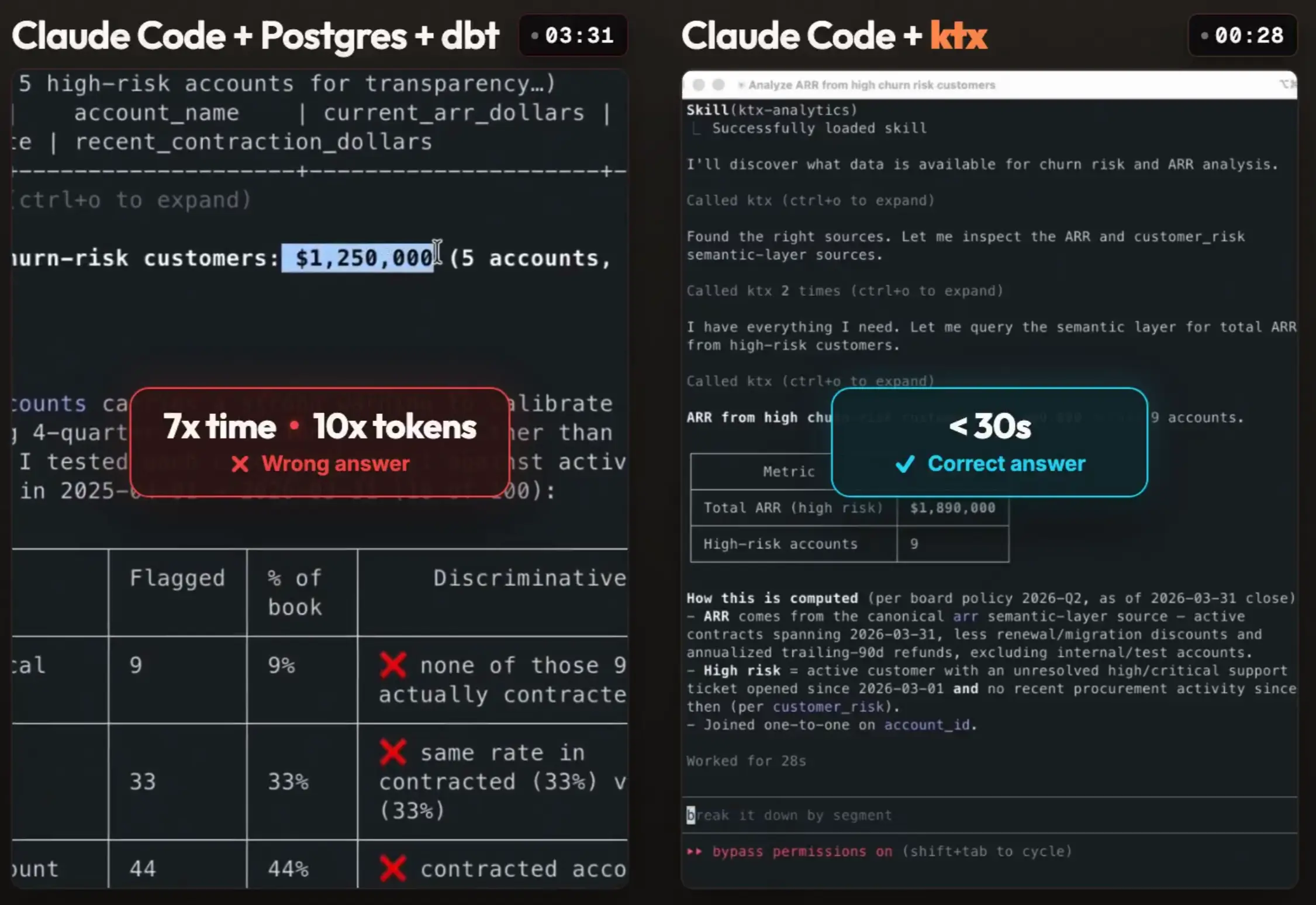
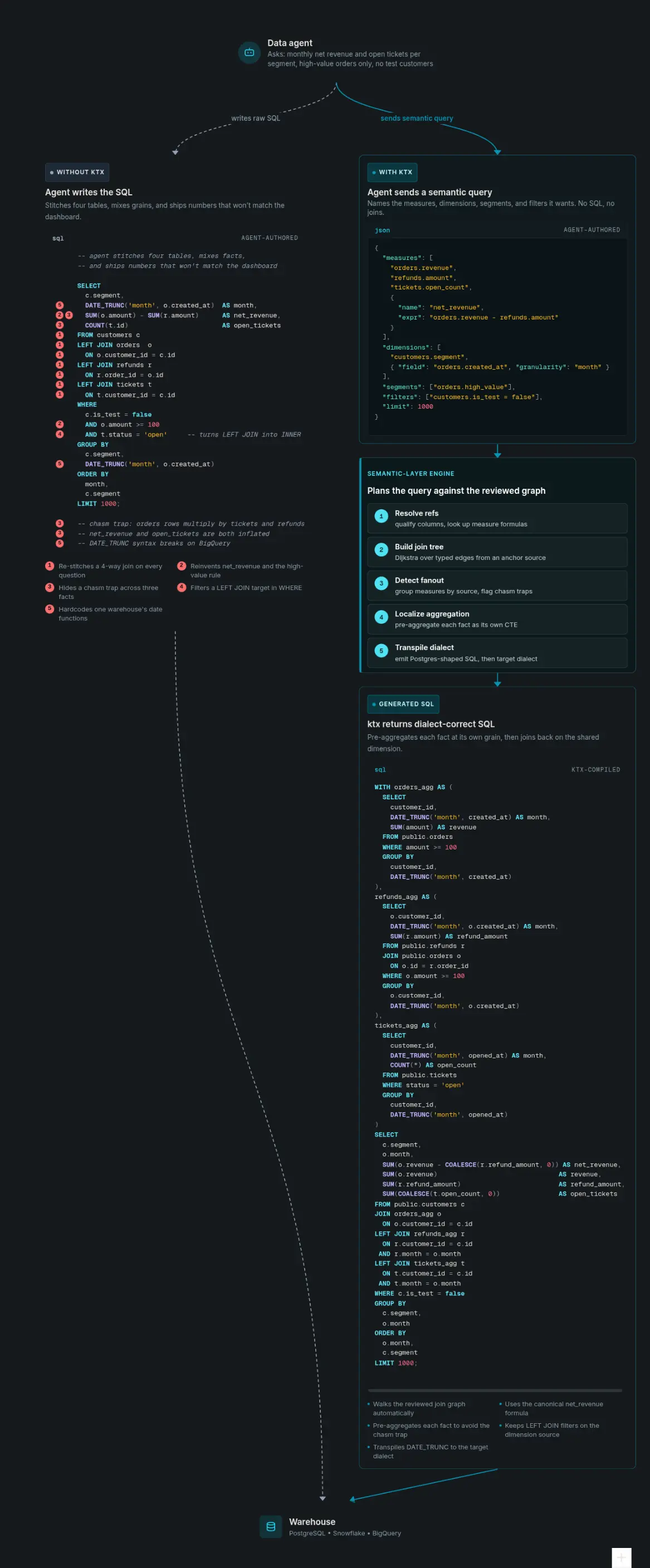
If you compare using raw Claude Code vs. the ktx semantic layer component (the wiki component helps too, but the semantic layer is key for the speedup) with extended context, you get faster and more correct answers with ktx. Here's such an example:
ktx has basically two connected sides where the first one builds and maintains the context layer, and the second serves that context to agents at runtime, which you see above.
Anatomy of Context Layer in ktx
The anatomy of a context layer is based on two files and two jobs. YAML for what the warehouse can execute. Markdown for what the team needs to interpret it. Both are committed to git and reviewed like code.
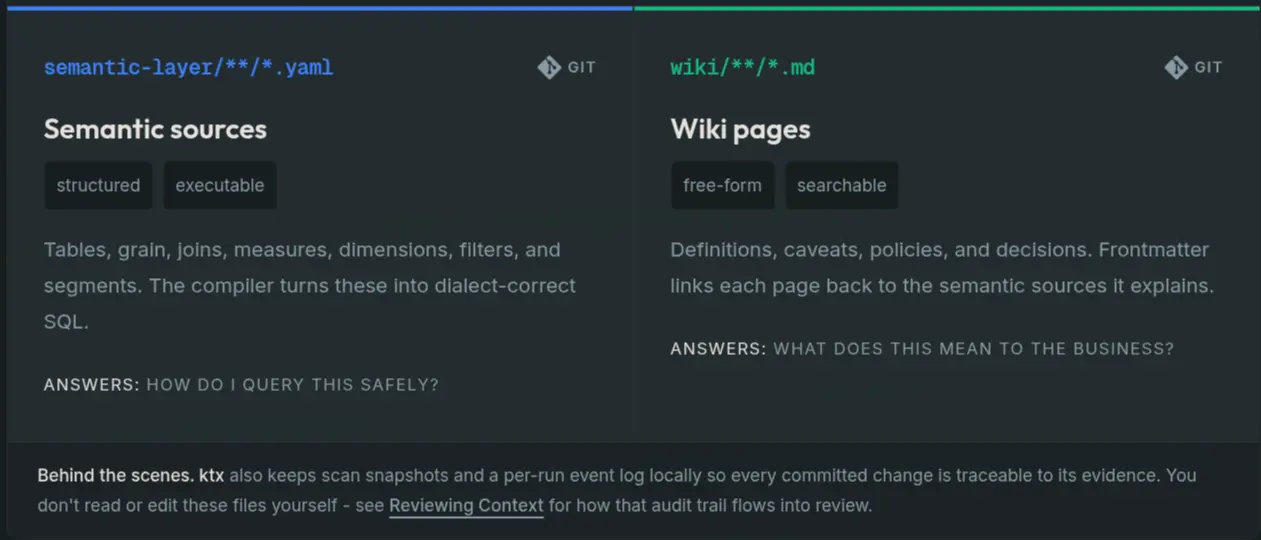
The wiki is the self-organizing collection of ingested Markdown files. And for the YAML files, ktx has a similarly self-organizing executable semantic layer.
ktx ingest pulls raw data from your data stack into a context layer, where you can also edit and create additional context manually. Additionally, you plug ktx into your agent of choice, which allows that agent to send extra memories for ingestion to keep the context up to date based on actual source data.
The semantic part is a set of functions that define metrics precisely, like "monthly revenue" or "profit", so if you ask your agents, ktx knows exactly how to pull the data and answer the query with SQL, running it consistently.
Context as Code: How to Use Context Layer
ktx is open source and you can install it with npm install -g @kaelio/ktx. It has a self-improving context layer that teaches agents how to query your warehouse accurately, from approved metric definitions, joinable columns, and business knowledge it builds and maintains for you.
With the ktx CLI you get context as code, writing wiki pages and semantic-layer definitions as git-based files you can review, diff, and merge. This is to update and enhance current context (documentation) you have in your company, and provide it to your agents as well. Git-based, so humans and agents can collaborate on it by editing the same context.
So how does it work? Here are the most common commands you can run and use. We don't go through the whole CLI reference, but cover the most important ones to get a feel for how to work with the ktx CLI. Six commands cover the loop from check status → discover → verify → serve.
1. Is Everything Wired Up? → ktx status
First, get the status, which tells you which connections, LLM, and embeddings are live before you do anything else.
ktx status LLM claude-code · sonnet ✓
Embeddings all-MiniLM-L6-v2 (384d) ✓
Storage sqlite (state) · sqlite-fts5 (search)
Connections (4)
✓ orbit postgres
✓ metabase metabase
✓ dbt dbt
✓ notion notion2. Discover & Search Metrics → ktx sl
sl is the semantic layer, the YAML definitions that tell agents how to turn "revenue" into correct SQL. Bare ktx sl lists every source and you can add a query to search. Add --json when an agent (not a human) is reading.
ktx sl                       # list all semantic sources
ktx sl "revenue" --json      # search, machine-readable
ktx sl "int_active_contract_arr" --json
The JSON result is rich: a relevance score, a snippet, and matchReasons showing why it matched (lexical, token, semantic). Trimmed:
{
  "name": "int_active_contract_arr",
  "path": "semantic-layer/orbit/_schema/orbit_analytics.yaml#int_active_contract_arr",
  "columnCount": 5,
  "score": 0.036,
  "matchReasons": ["lexical", "token"]
}
This is what makes an agent cheaper and more accurate as it finds the right metric from context instead of guessing field names against your warehouse.
3. Verify Before You Trust → validate + query --format sql
When you edit a metric, always test first against the live schema with the following command:
ktx sl validate mart_revenue_daily --connection-id orbitvalidate catches missing columns, bad joins, and unsafe source names, so you fix the YAML before it hits production data. Then compile the SQL and read it before running anything:
ktx sl query \
  --connection-id orbit \
  --measure mart_revenue_daily.total_net_revenue \
  --dimension mart_revenue_daily.revenue_date \
  --format sql
Swap --format sql → --execute --max-rows 100 once the SQL looks right. The pattern is always: compile, eyeball, then run.
4. Search the Soft Semantics → ktx wiki
Metrics are the hard facts. The wiki is the soft semantics we were talking about, such as the business definitions, rules, and gotchas in Markdown that agents search for context. Same shape as sl: bare lists, query searches.
ktx wiki "new hire" GLOBAL (4 pages)
#1 new-hire-onboarding-requirements — what every new hire must know by week one
#2 orbit-arr-methodology — contract-first ARR definition + NRR treatment
#3 orbit-company-overview — what Orbit sells, plan tiers, workflow
#4 implementation-handoff-process — Sales Ops → CS handoff requirementsWhen sqlite-fts5 is configured, wiki search is hybrid with lexical, token, and semantic (embeddings) lanes combined and ranked together. That's how an agent finds "ARR methodology" when someone asks about "annual revenue."
5. The Raw Escape Hatch → ktx sql
Need to peek at the actual rows? ktx sql runs read-only SQL (single SELECT/WITH only) against a connection.
ktx sql --connection orbit "select count(*) from orbit_analytics.int_procurement_qualifying_actions"Most of the time you want ktx sl query, not raw ktx sql. Reach for sql only when you genuinely need rows the semantic layer doesn't model yet.
6. Hand it to Your AI Agent → ktx mcp + ktx setup
This is what your business users or engineers might use most often, connected with actual agents. Start the MCP server, then wire up your agent of choice:
ktx mcp start
ktx setup --agents --target claude-code
setup drops a .mcp.json into your project and installs the analytics skill. Next time Claude Code opens in that directory, it picks up the ktx MCP server and starts answering questions with your governed context, calling ktx sl and ktx wiki under the hood instead of hallucinating field names.
● Skill(ktx-analytics)
  Called ktx 8 times

● Here are the metrics defined in the orbit semantic layer:
  mart_arr_daily         arr                  ARR ($) — contract-first
  mart_revenue_daily     total_net_revenue    gross − credits − refunds
  mart_customer_health   at_risk_customer_count   distinct high-risk accounts
  ...
The agent discovered every metric on its own. No copy-pasted schema, no guesswork.
The Whole Loop
Recapping the full workflow in one loop:
ktx status              # 1. is it wired up?
ktx sl "revenue"        # 2. discover metrics
ktx sl validate …       # 3. verify against schema
ktx wiki "ARR"          # 4. pull in business context
ktx mcp start           # 5. serve it to your agent
When you're done, shut the runtime down cleanly:
ktx admin runtime stopGo deeper: Building Context · Writing Context · Reviewing Context · Serving Agents · LLM configuration
The Workflow: From Source to Context Layer
From reading configured source connectors (1) from databases, BI tools, modeling code, docs and notes, to context building and extracting the context (2) of each, to reconciliation (3) of creating new semantics and metrics based on it, to validation (4) and checking references before agents rely on them.
Resulting in a wiki and semantic layer that is referenced and self-improving, and this is how the semantic layer part looks within ktx:
Why a Governed Context Layer Matters
Wrapping up, I know this has been a lot of new information, but I'm very excited about the direction of ktx and integrating logical layers such as metrics and semantic layers with more advanced business context, and with everything being fully open source for you to try out.
But the challenge of natural language for semantic layers being too imprecise is real. A context layer with hard and soft defined configurations will help the conversational interface via the agents tremendously. More context doesn't always help, but if it's well maintained and fetched from the actual source or pulling in actual domain knowledge from Notion pages, it's priceless.
Also, the feature of easily automating commands via CLI and adding or fixing wrong context in a central repository quickly is super helpful. This keeps the human in the loop and provides a consistent way to verify a governed layer that holds the company's context while using the power of agentic engineering.
If you like this, try ktx with the getting started guide, and star it on GitHub. It's all open source.
FAQ
What is a context layer for data agents?
A context layer turns your warehouse schema, joins, approved metric definitions, BI logic, query history, and internal documentation into reviewable files that agents can search and execute. Instead of starting from a cold database connection, the agent gets a warm start: it queries governed context to produce accurate SQL rather than guessing field names against raw tables.
What is the difference between hard semantics and soft semantics?
Hard semantics are the executable definitions: your warehouse schema, joins, and metric definitions expressed as YAML and SQL. Soft semantics are the business context that normally never reaches an agent, such as documentation, wikis, and Notion pages written by domain experts. A context layer pulls both into one reviewable place so agents have the full picture.
How is a context layer different from a semantic layer like Cube or dbt?
A semantic layer focuses on modeling metrics and domain knowledge, and it can take significant effort to build from scratch. A context layer is an evolution of that idea: it's largely auto-generated, and around the semantic model it adds unstructured business knowledge from sources like Confluence, Notion, and internal wikis that a standalone semantic layer doesn't capture.
How does a context layer make agents cheaper and more accurate?
Queries on warehouses like Snowflake, BigQuery, and Fabric can be expensive, and agents iterate quickly. With more governed context available up front, an agent can pull the right metric and join path from context instead of guessing, so it needs fewer and cheaper queries against the warehouse and arrives at correct answers in fewer iterations.
What is ktx?
ktx is Kaelio's open-source context layer. It ingests your data stack and internal docs into an executable semantic layer (YAML and SQL) plus a self-organizing wiki (Markdown), all committed to git and reviewed like code. Agents reach it through the CLI and an MCP server, calling ktx sl and ktx wiki under the hood instead of hallucinating field names.
How do I get started with ktx?
Install it with npm install -g @kaelio/ktx and run ktx setup, or give your agent the prompt: run npx skills add Kaelio/ktx --skill ktx and use the ktx skill to install and configure it. There's a public demo project that fetches data from Postgres and Notion with a dbt project and a Metabase interface, and the quickstart walks through connecting your own sources.